Important read about new "Extra light protection" and adjustment "Tracktion switch"

T-Scann 8 - project page
Super 8 / Regular 8 film scanner
Arduino to card Controll T-Scann 8 Ver 1.80 Update to ver 2.0 coming later, works similar
This is how ver 1.80 works.
When the scan starts, the program detects if it is Super 8 or regular 8. This is done to set the correct number of braking steps.
// Detect whether Super 8 or Regular 8
364. if (typeF >= 2 && WstepLast > 280 && WstepLast < 300 ) {
WstepS = 270; //R8
}
if (typeF >= 2 && WstepLast > 300) {
WstepS = 290; //S8
}
Now the program knows that it is Super8, the distance between each frame is about 315 steps.
1 - 290 steps now the variable "sped" changes from 900 microsecond to 30000 microsecond.
355. if (Wstep >= WstepS && typeF >= 2 ) {
sped = spedS;
}
2 - "perfLevel" is now 260 and the picture can be taken
3 - After exposing the image, "sped" is reset to 900
"Wstep" counts the number of steps between frames, resets.
"WstepV" determines that the minimum number of steps before a new exposure can occur
is at least 200 steps. This is to minimize the risk of exposure in the wrong place. Tape or cement joints can be detected, like perforation, but are avoided this way.
This is the code for winding the film on wheel-c.
The start value of "inDraTime" is 11000. The movie is stretched when the scan begins.
// ------------ Stretching film pickup wheel (C) ------
inDraState = digitalRead(inDra); / This line reads the "Traction stop" switch
if (Play == HIGH && inDraState == LOW && (time - LastTimeDra) >= inDraTime) {
digitalWrite(stepSpoleC, LOW); digitalWrite(stepSpoleC, HIGH); LastTimeDra = time;
}
Each time the Tracktion switch turns on, the speed decreases slightly
by "inDraTime = inDraTime + 800;" increased.
361. if (Play == HIGH && inDraState == HIGH) {
inDraTime = inDraTime + 200;
}
kolla igenom ---------------------------------------------
The maximum time "inDraTime> = 80000" is 1200 which then reduces the time to 7000. The speed / time can then vary between 7000 and 12000.
400. if (inDraTime >= 80000 && inDraState == HIGH) {
inDraTime = inDraTime + 1200;
}
If you want to study how this function works
replace "measureP" with "inDraTime" and use "Serial monitor" in Arduino IDE. This value usually fluctuates up and down.
370. if (Play == HIGH) {
Serial.println(measureP);
}
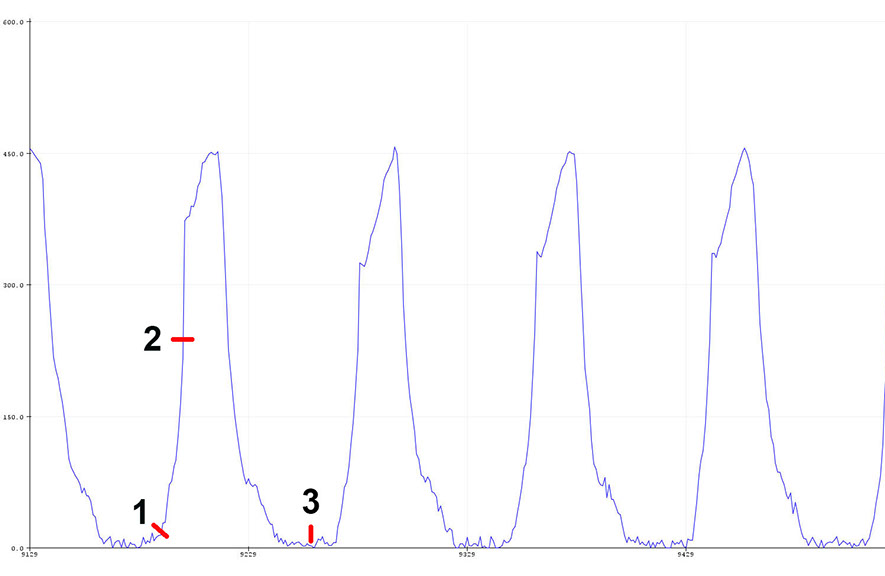
Arduino IDE has a function under Tools - Serial Plotter - which makes it possible to see the detection of
film perforation in real time.