
T-Scann 8 - project page
Super 8 / Regular 8 film scanner
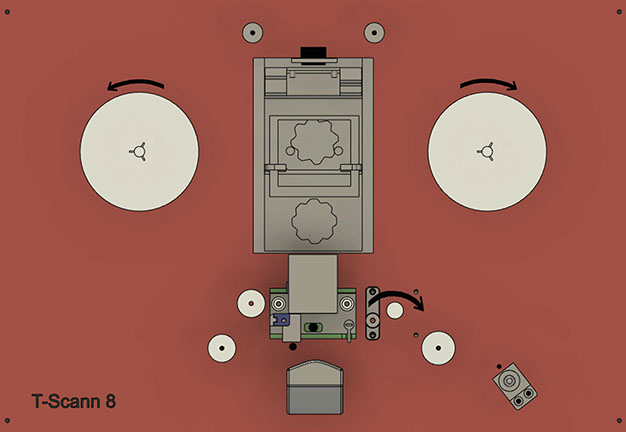
Stepper motor-A rewinds the film only -Spins LEFT-
Stepper motor-B winds up the film -Spins RIGHT-
Stepper motor-capstan pulls the film -Spins RIGHT-
If the stepper motor goes in the wrong direction, just turn the connector on the controller card.
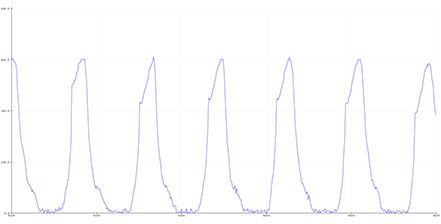
The next step is to see that the film perforation is detected. With the Arduino IDE and the Serial Plotter function, it should look something like this
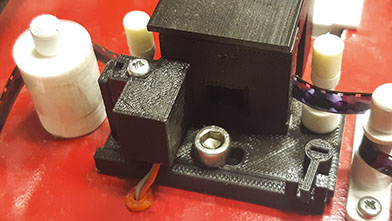
1- Without film in filmgate, turn up and down to maximum output level approx. 800-900.
2- Insert film using the white starter film. Screw up and down so that the tops are maximum and the bottom is as low as possible.
3- Now try the real film, if it should be able to detect blank film between the perforations, it is important to optimize the line in the arduino code (ver 1.71)
50 int Wled = 250; / max is 255 - decrease the value
54 int perfLevel = 260; / this value may need to be lowered
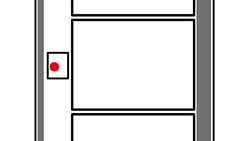
Reading perforation should be in this area
of film perforation
When the scanner is turned on, then capstan-B and Wheel-C hold
position / locks position. Wheel A is in free position.
Traction stop in PLAY mode, if the arm is pressed down wheel-C stops
Lowest level 20-30
(with extra light protection for phototransistor)
Maximum level about 450
The Perf Level value when the curve is going up, change according to your system for best precision.
This knob is for adjusting the image heightwise, can be adjusted in play mode.