
T-Scann 8 - project page
Super 8 / Regular 8 film scanner
Raspberry PI user interface
Control of the scanner takes place with Raspberry PI 3 or 4
with a 4:3 screen / keyboard / mouse.
Storage takes place on a hard drive or USB memory that is connected to the back of the scanner.
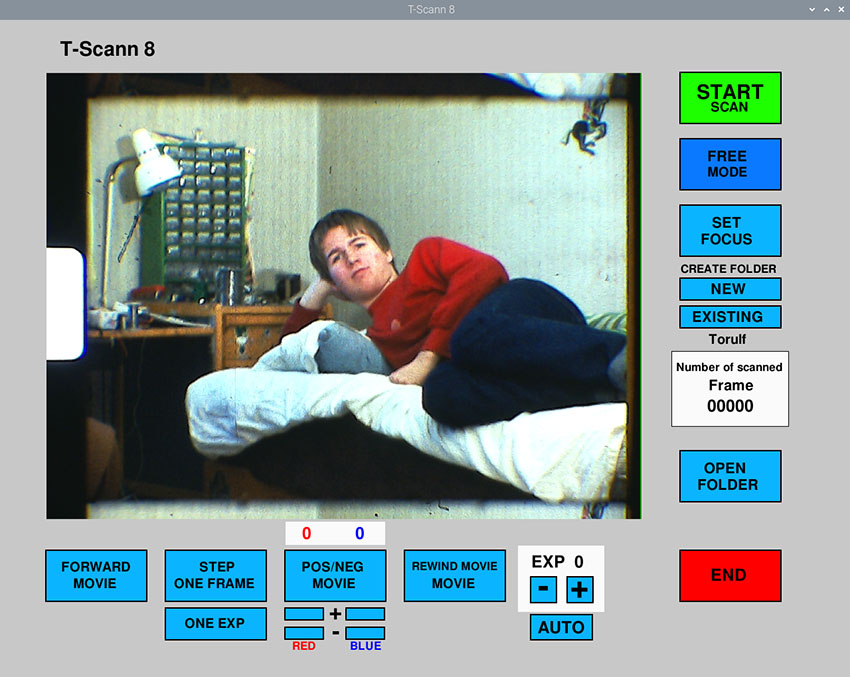
Resume scanning type in the name of the folder in the popup box, enter the last box on previously scanned frames, for example 1230 then the next frame will be scanned 1231. If the last frames from 1200 are to be scanned re-enter 1199, then 1200 and so on will be written over with new frames.
Not sure what the folder was called? check with the "OPEN FOLDER" button.
Drive the film 1 frame, this function is convenient when the film gate is set, so the image is as above.
Scan negative
There are nowadays negative super 8 films to buy
Open the file manager. Close the file manager on X.
If named folder exists, this folder is opened, otherwise the root of the USB drive "SMALFILM"
-AUTO-
The program starts in AUTO mode, switch to MANUAL. Then exposure can be set and color correction.
Rewind the movie, must be loaded around the rear rewind wheels! Not when the movie is loaded in filmgate.
Color correction
Take a picture without extending the film, At each click a beep is heard, the number of frames i counted
Free mode is used when the film is loaded into the scanner